CarPlay Sync for Android Auto
- 3.1
- Rating
- 10.00K
- Installs
- Free
- Price
 Analysis by App-foxy
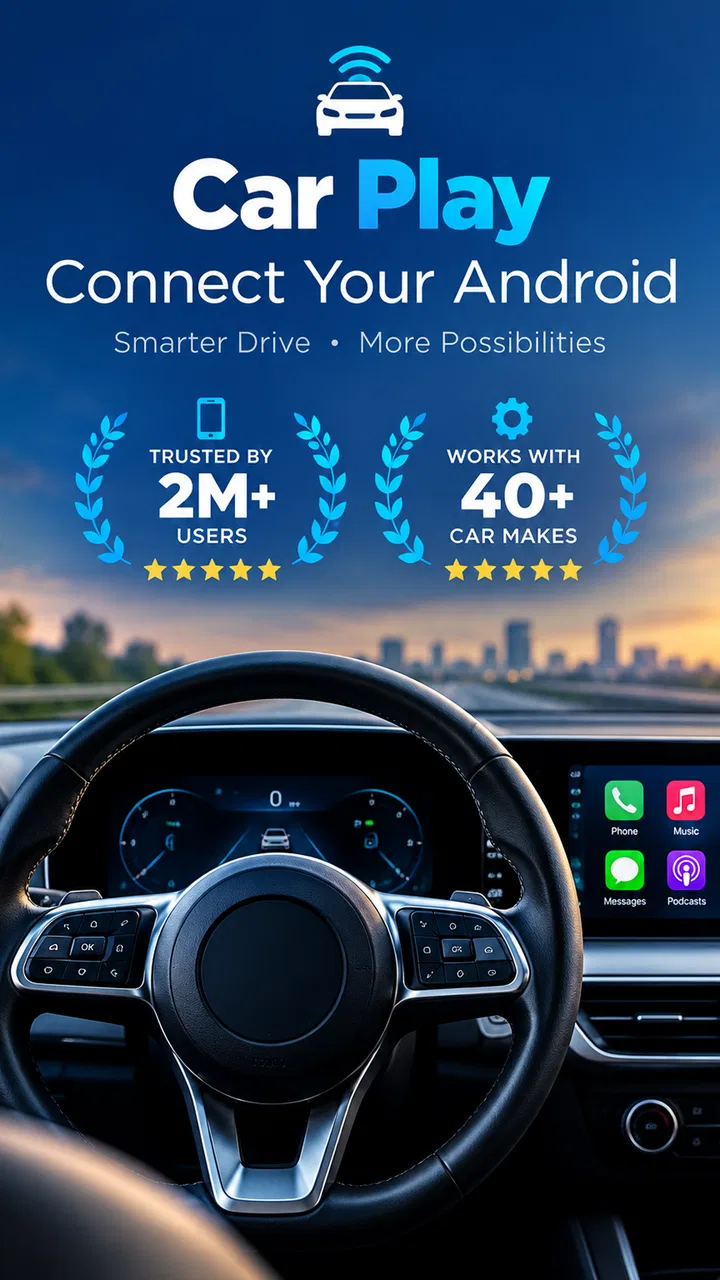
CarPlay Sync for Android Auto is the kind of app I would examine carefully before relying on it during a daily commute. Its purpose is straightforward: it aims to connect an Android phone with a car display so the driver can handle selected phone content, media, and calls from a larger in-car interface. That sounds convenient, but the real question is whether the experience remains understandable and manageable when the road, the car screen, and the phone are all competing for attention.
I reviewed it as an Auto & Vehicles app from Auxillary Cloning studio, with a focus on how approachable it feels for different people and situations. It is free to install, carries an Everyone age rating, and has reached over ten thousand installs. The overall rating is around 3.1 from roughly thirty-five ratings, which suggests a mixed first impression rather than a universally smooth experience. I think that matters here: a connection tool can be useful when it works, but small setup problems become much more frustrating when you are trying to leave home on time.
How the interface feels to read and navigate
I find that a car-screen interface is only helpful when I can understand its state at a glance, so this section looks at the practical cues that make navigation feel clear rather than merely large. I would use a parked setup to learn where connection and media controls appear, then check how easy they are to spot from the normal driving position. That visual check leads naturally to the sensory demands of using the display and its audio.
You May Also Like

 Blood Strike: 2.5 Anniversary
Blood Strike’s Loadouts Turn Every Drop Into a Tactical Gamble
A close look at Blood Strike’s custom loadouts: how fast access to signature weapons reshapes its battle royale rhythm, rewards preparation, and narrows the gap between fights.

 Pandora - Music & Podcasts
Pandora’s Music Is Easy to Start, but Harder to Recover
Pandora’s strength is its low-effort path from a seed to a station. Its weak spot is how much confidence it asks you to place in connection, setup, and quiet recovery.

 8 Ball Pool
 Is Built on Rivalries, Rematches, and Routine
A close look at the rivalries, rematches, shared routines, and unanswered safety questions that turn a quick pool match into a persistent mobile community.

 Samsung Music
’s Quiet Strength Is Playing What You Already Own
Its reach comes less from spectacle than from dependable access to a personal library. That simplicity is both the app’s strongest retention engine and its ceiling.

 AccuWeather: Weather Radar
AccuWeather Review: A Quick, Clear Forecast for Everyday Decisions
For everyday plans, the best forecast is the one you can understand quickly. AccuWeather makes rain timing, radar, and local conditions easy to act on, with a few trade-offs.

 Hill Climb Racing
Why Hill Climb Racing Still Turns Crashes Into One More Run
A tiny car, a bumpy hill and one more upgrade: Hill Climb Racing keeps resurfacing because its simple chaos makes every near-miss feel personal.
More From Our News Desk
View All News


A simple purpose, but not necessarily a simple first session
The main appeal is easy to understand. Instead of repeatedly picking up a phone to check media or manage a call, the app is intended to place those activities on the car’s screen. For many drivers, that larger display can be easier to glance at than a handset mounted low on the dashboard. The short label “CarPlay Sync” also makes its intended role clear, even though Android users should not assume that the experience is identical to Apple’s native CarPlay system.
In practical use, I would approach the first launch as a setup task rather than something to do while already sitting at a traffic light. The phone and vehicle need to be ready, the car display needs to be available, and the connection process needs your attention. A person who reads small text slowly, has difficulty distinguishing crowded controls, or simply dislikes technical setup may find the first few minutes more demanding than the store summary suggests.
Once a connection is active, the larger car display should be the more comfortable place to look for supported controls. That is especially helpful for someone who struggles with small phone icons or with switching between apps while holding a device. Still, the quality of that benefit depends on the vehicle display and the way the car handles the connection. The app cannot make every dashboard screen equally legible, and it cannot remove the need to understand the car’s own menus.
Why glanceability matters more than visual polish
For an in-car tool, I care less about decorative design than about whether I can identify the current state quickly. Is the phone connected? Is the media session active? Is a call being managed through the car? Those are the questions that should be easy to answer without studying the screen. If the app or the vehicle leaves those states unclear, the driver may spend more time troubleshooting than expected.
My practical tip is to complete a short stationary test before treating the app as part of your normal driving routine. Connect it at home or in a parked car, open the functions you expect to use, and learn which controls belong to the phone and which belong to the vehicle. This is a more useful test than simply confirming that the app installed successfully. It also gives you a chance to adjust text size or display settings on the phone and car if those options are available in your setup.
The app is running as version 36.0 and supports Android 7.0 or later. That broad operating-system range may make it relevant to people who keep an older phone in the car, but older hardware can also affect responsiveness and screen readability. I would not assume that an older Android device will feel as quick or stable as a newer one just because it meets the minimum requirement.
Navigation for people who prefer fewer steps
Someone who wants one predictable routine may appreciate the idea of connecting once and then using the vehicle screen for common tasks. The strongest workflow is likely a repeatable one: prepare the phone before driving, connect while parked, confirm the car recognizes it, and leave the handset alone afterward. That reduces the number of decisions required on the road.
On the other hand, people who frequently change vehicles, switch phones, or move between different connection methods may face more friction. Every car can present its own menus and behavior, so the same app may feel straightforward in one vehicle and confusing in another. This is one reason I would treat it as a convenience layer, not as a guarantee that every Android phone and every dashboard will cooperate in exactly the same way.
Motor, hearing, and sensory considerations
For me, accessibility here depends on more than tapping comfortably: glare, contrast, sound routing, and the effort of reaching a dashboard can all change how usable the same setup feels. I would test those conditions while parked and make any display adjustments before setting off, rather than trying to compensate mid-drive. The next section considers how those personal needs play out across ordinary trips and changing circumstances.
Reducing phone handling is the clearest accessibility benefit
The most meaningful strength for motor accessibility is the possibility of leaving the phone in place while using the car’s interface. Reaching into a pocket, holding a handset, or tapping tiny controls while the vehicle is moving is difficult for many people and unsafe for everyone. If the connection works reliably, shifting interaction toward the dashboard can reduce unnecessary handling and make a familiar routine less physically awkward.
This can help a driver with limited finger dexterity, reduced grip strength, or difficulty performing precise taps. It may also help a passenger who is managing music or a call but does not want to hold the phone throughout a journey. The benefit is not automatic, though. A car display may still require small touch targets, and steering-wheel buttons or voice controls may be easier for some users than a touchscreen.
I would test the controls with the car stationary and with the driver seated in the normal position. A button that looks large enough when you are close to the dashboard may feel much less forgiving when you are belted in, wearing gloves, or reaching from the passenger seat. If the vehicle has physical controls, I would use those whenever possible and regard the app as the connection bridge rather than the only control method.
Visual and hearing needs require a realistic plan
A larger screen can improve visual access, but “larger” does not always mean “clear.” Contrast, glare, viewing angle, font size, and dashboard placement all matter. Bright sunlight can wash out a display, while night driving can make an overly bright interface distracting. I found that the sensible approach is to adjust the phone and vehicle display before the journey, then avoid changing settings while moving.
People with color-vision differences should not depend on color alone to understand connection status or call state. I would look for text labels, familiar symbols, and audible confirmation from the vehicle, but the exact behavior will depend on the phone and car combination. Since the app’s job is tied closely to the dashboard, the surrounding hardware has a major role in whether the experience is genuinely readable.
For drivers who are deaf or hard of hearing, visual call and media indicators can be more important than sound prompts. For drivers who are blind or have very limited vision, a touchscreen mirroring workflow may not be the best choice unless the car and phone already provide a dependable spoken interface. I would not choose this app on the assumption that it supplies a complete screen-reader experience. It is better viewed as a way to place compatible phone activity onto a vehicle display, not as a dedicated accessibility system.
Calls and media are different kinds of interaction
Media control is usually easier to make glanceable than a live phone conversation. A person may only need to pause, resume, or choose something familiar, while a call involves contact selection, audio routing, and knowing whether the other person can hear clearly. The app’s focus on calls is useful, but I would test call behavior with someone I trust before depending on it for an important conversation.
A good test includes answering a call while parked, checking where the sound comes from, confirming that the microphone works, and ending the call from the expected control. This is also helpful for people with speech, hearing, or motor differences because it reveals whether the car’s controls are comfortable and whether another method, such as a steering-wheel button, is preferable.
Situational access in everyday driving
I would judge the app in the context of a real journey, not just a successful connection at home: a quiet passenger trip and a rushed commute place very different demands on attention. A repeatable routine, with setup completed before moving, can help keep the car screen from becoming another distraction. From there, it is worth weighing the practical obstacles that might prevent that routine from working consistently.
A realistic commute workflow
Imagine leaving work after a long day. Your phone is in your bag, the car is warm, and you want a familiar audio program while keeping your hands free. The useful version of this experience is not opening the app while pulling away. It is preparing the phone before starting, connecting while parked, checking that the car screen shows the expected session, and then using the dashboard controls for the rest of the trip.
That routine can be especially valuable for someone who becomes overloaded by multiple screens or who needs extra time to process visual information. It creates a clear boundary between setup and driving. It also helps a passenger with limited mobility manage media without repeatedly asking the driver to handle the phone.
The less comfortable scenario is a rushed departure after the connection fails. If you have to unlock the phone, inspect settings, reconnect, and compare several screens, the app can increase distraction instead of reducing it. My advice is to keep a backup routine: use the car’s built-in controls when available, postpone troubleshooting until parked, and do not treat a successful connection on one day as proof that every future start will be identical.
Different vehicles and changing contexts
People who drive one familiar car may get more value from the app than people who use rental cars, shared vehicles, or several family cars. A consistent dashboard makes it easier to remember where controls are and what a normal connection looks like. In a shared vehicle, the setup may need to be repeated, and another driver may not want the phone connected at all.
Passengers are another important use case. A passenger can benefit from a larger interface without holding the phone, especially on a long trip. However, the passenger should still avoid making the driver look away or reach across the cabin. The app may support a more comfortable arrangement, but safe division of attention still depends on how the people in the car use it.
When a native alternative is the better choice
If your car already offers dependable built-in Android Auto support, I would compare that experience before making this app the center of your routine. A native vehicle integration may provide a more familiar connection path and better alignment between the car’s buttons, audio system, and display. If your vehicle has a manufacturer-specific companion app, that may also be preferable for car settings or vehicle information, since a phone-mirroring utility is not a replacement for those functions.
For someone who mainly wants music, a simple Bluetooth connection may be less complicated. Bluetooth can avoid the need to mirror a phone screen, although it may offer fewer visual controls. For someone who needs navigation or hands-free calling, the best option is the one that requires the fewest glances and the least physical interaction in that particular car. I would not install this app merely because it mentions CarPlay; I would install it only if its connection approach solves a problem that my current setup does not.
Remaining barriers before making it a daily tool
Before making this part of my daily driving routine, I would want to know that it connects reliably with my own phone and vehicle and that the controls suit the people who will use them. A useful final check is to try the intended call and media tasks while parked, then compare the experience with the car’s built-in controls or Bluetooth. Those remaining barriers shape whether the convenience is worth keeping.
Compatibility is the main practical uncertainty
The app’s promise depends on three pieces working together: the Android phone, the app, and the car’s display system. A phone meeting the operating-system requirement does not automatically mean that every vehicle connection will behave the same way. Cable quality, wireless behavior, dashboard software, and the car’s own input controls can all influence the result.
This is why I would not judge it solely by whether it opens on the phone. The meaningful test is whether it connects to your specific vehicle, stays connected during a normal journey, and lets you perform the tasks you actually need. Test media, calls, and reconnecting after turning the car off. Those checks reveal much more than a quick launch.
Free to start does not mean every use is cost-free
The app is free, but it includes in-app purchases priced from $4.99 to $15.99 per item. That changes how I would evaluate it. I would first establish whether the basic experience is useful for my car and whether the controls suit me before paying for anything. A person who needs a predictable, low-cost solution should pay close attention to what is available without an upgrade and whether a purchase is actually necessary for their intended workflow.
This pricing structure may be reasonable for someone who gains a daily convenience from the connection, but it is less attractive for occasional drivers or people whose vehicle already handles the same tasks. I would also avoid purchasing immediately after a frustrating setup attempt. First determine whether the problem is a temporary connection issue, a vehicle limitation, or a feature boundary that payment would not solve.
Trust, attention, and personal comfort
Any app involved in calls and media deserves a careful approach to privacy and phone handling, even when the main concern is simply getting connected. I would review the app’s own prompts and the phone’s permission requests during setup, and I would avoid granting access that does not seem relevant to the tasks I want to perform. I would also disconnect the phone from a shared or rental vehicle when finished.
The app is rated for Everyone, which makes it broadly approachable from an age perspective, but that rating does not tell me whether it will be comfortable for every ability or every driving environment. Accessibility is highly personal here. One person may welcome the larger dashboard view, while another may find the touchscreen, glare, or connection steps more difficult than a physical control or a simpler Bluetooth setup.
My inclusive verdict on CarPlay Sync
After weighing the practical details, I see CarPlay Sync as a potentially useful bridge for Android users who want phone media and calls available through a compatible car screen. Its best case is specific: one familiar vehicle, a phone that meets the software requirement, a connection tested in advance, and a driver who benefits from moving interaction away from a small handset.
I would recommend it to someone who is comfortable doing a careful parked setup and who wants to reduce phone handling during ordinary trips. It may also suit passengers who need easier access to media controls, or drivers who find a dashboard display more readable than a handheld screen. The strongest accessibility advantage is not a special mode; it is the possibility of creating a more stable, less hand-intensive routine.
I would advise caution for anyone who needs guaranteed compatibility, depends on a highly predictable spoken interface, changes vehicles often, or already has excellent native Android Auto support. In those situations, the usual built-in option, physical dashboard controls, or straightforward Bluetooth may be less frustrating. The mixed average rating reinforces my view that this is an app to test with your own car rather than accept on faith.
My bottom line is simple: use it as a carefully tested convenience, not as something to troubleshoot while driving. Auxillary Cloning studio has made a free tool with a clear everyday purpose, but its inclusive value depends heavily on the surrounding phone and vehicle. If the connection is stable and the display works for your eyes, hands, and hearing needs, it can make a commute more manageable. If it adds another layer of setup or uncertainty, choosing the car’s native system is the more accessible decision.
FAQs for CarPlay Sync for Android Auto
01What is CarPlay Sync for Android Auto?
CarPlay Sync for Android Auto is an innovative app designed to enhance your driving experience by integrating the functionalities of both Apple CarPlay and Android Auto. It allows users to seamlessly switch between these platforms, providing access to navigation, music, and messaging services in a unified interface.
02Is CarPlay Sync compatible with all vehicles?
CarPlay Sync for Android Auto is compatible with most vehicles that support either Apple CarPlay or Android Auto. However, it's essential to check your car's infotainment system specifications and ensure it supports the required connectivity options like Bluetooth or USB for optimal functionality.
03Do I need to pay for CarPlay Sync?
CarPlay Sync offers a free version with basic features, but for a full experience, premium features can be unlocked through a subscription or one-time purchase. These premium features might include advanced navigation, voice control enhancements, and additional app integrations to improve your driving experience.
04How does CarPlay Sync ensure user safety while driving?
CarPlay Sync is designed with safety in mind, providing voice control options and an intuitive interface to minimize distractions. It supports hands-free operations, allowing you to make calls, send messages, and control music through voice commands, thus keeping your focus on the road.
05What are the system requirements for using CarPlay Sync?
To use CarPlay Sync, you need a smartphone running Android or iOS with up-to-date operating system versions. Additionally, a compatible vehicle infotainment system is required. It's recommended to have a stable internet connection for real-time navigation and app updates to ensure smooth operation.
Pros
- Seamless integration with Android Auto.
- User-friendly interface design.
- Supports voice commands efficiently.
- Frequent updates enhance functionality.
- Compatible with a wide range of devices.
Cons
- Limited customization options available.
- Some features require premium purchase.
- Occasional connectivity issues reported.
- Not all car models are supported.
- High battery consumption during use.

CarPlay Sync for Android Auto
Gallery